How to implement Log Tracing in Google Cloud Functions v2 and Express

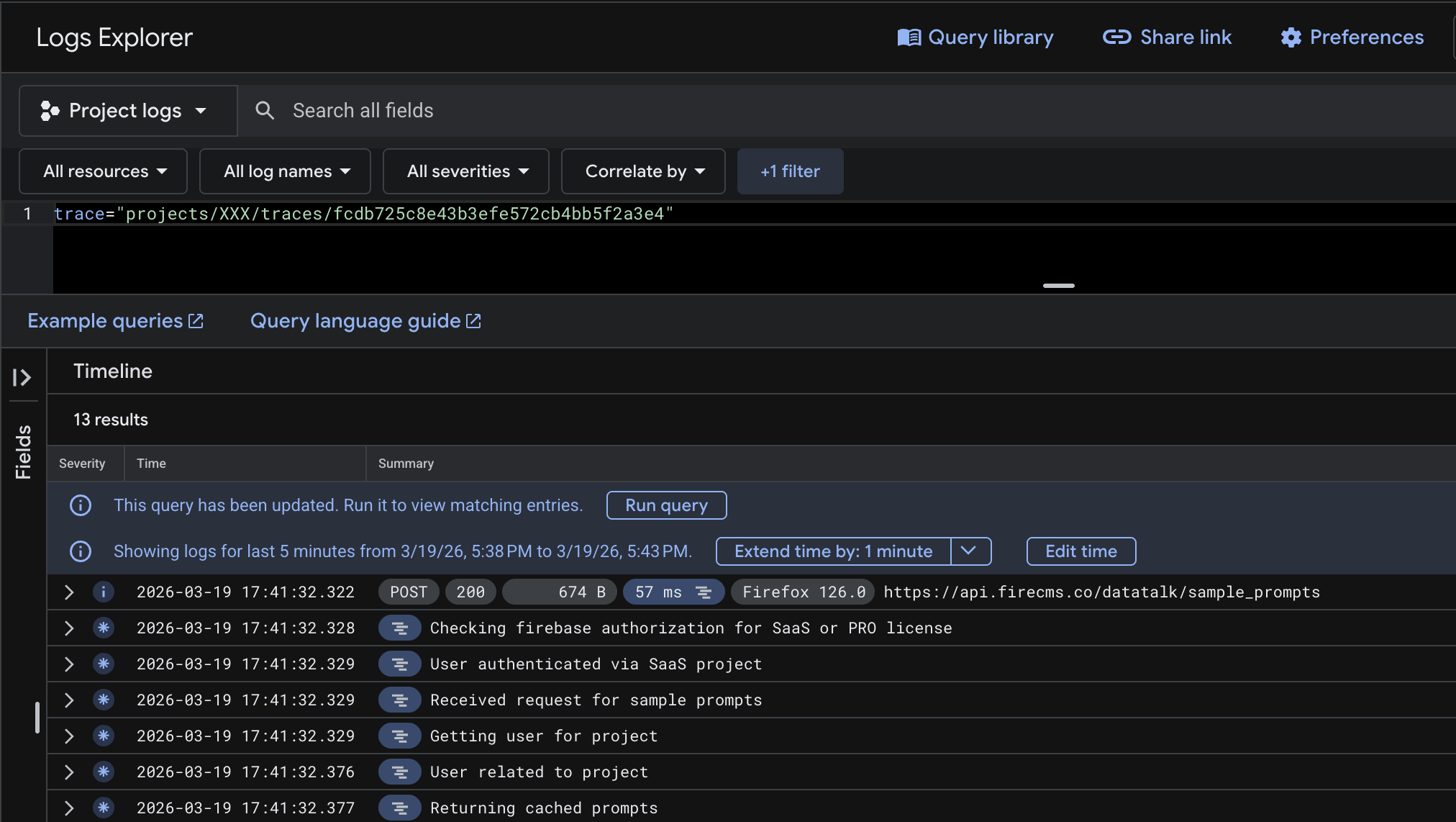
When building our backend API with Express on Google Cloud Functions, we noticed a significant difference when migrating from v1 to v2: request log correlation no longer works out-of-the-box.
In Cloud Functions v1, any console.log emitted during a request would automatically be grouped under that specific request’s execution in Google Cloud Logging. In v2 (which runs on Cloud Run), structured logging is required to correlate your application logs with the request that triggered them.
Without this, debugging becomes a nightmare. If multiple requests hit your Express API concurrently, identifying which log belongs to which request is almost impossible in the Logs Explorer.
In this article, we’ll show you step-by-step how we solved this by extracting the trace ID from the incoming request and using Node.js’s AsyncLocalStorage alongside Winston to automatically attach the trace context to every log — with zero boilerplate at call sites.
Step 1: Extract the Cloud Trace Header
Google Cloud Run (and therefore Cloud Functions v2) injects an X-Cloud-Trace-Context header into every incoming HTTP request. The header format is:
TRACE_ID/SPAN_ID;o=TRACE_TRUETo correlate a log entry with a specific request in Cloud Logging, you must include the trace ID in the logging.googleapis.com/trace field of your structured JSON logs.
Create a logging_trace.ts utility to extract these fields from an Express request:
// logging_trace.tsimport type { Request } from "express";
export type TraceFields = {    "logging.googleapis.com/trace"?: string;    "logging.googleapis.com/spanId"?: string;    "logging.googleapis.com/trace_sampled"?: boolean;};
/** * Best-effort extraction of Cloud Trace fields from the incoming Cloud Run header. * Header format: TRACE_ID/SPAN_ID;o=TRACE_TRUE */export function getTraceFieldsFromRequest(req: Request): TraceFields {    const projectId = process.env.GCLOUD_PROJECT;    const header = req.header("x-cloud-trace-context");
    if (!projectId || !header) return {};
    const [traceAndSpan, options] = header.split(";");    const [traceId, spanId] = traceAndSpan.split("/");
    const trace = traceId        ? `projects/${projectId}/traces/${traceId}`        : undefined;
    const traceSampled = options?.includes("o=1") ?? false;
    return {        "logging.googleapis.com/trace": trace,        "logging.googleapis.com/spanId": spanId || undefined,        "logging.googleapis.com/trace_sampled": traceSampled    };}
The GCLOUD_PROJECT environment variable is automatically available when running on Cloud Run / Cloud Functions v2.
Step 2: Store Context with AsyncLocalStorage
We don’t want to pass req down through every function call just to attach a trace ID to logs. Instead, we use AsyncLocalStorage from Node’s built-in async_hooks module. It propagates context automatically across any async/await chain that starts within a given run scope — perfect for per-request data.
Create a request_context_store.ts:
// request_context_store.tsimport type { Request } from "express";import { AsyncLocalStorage } from "async_hooks";
export type RequestLogContext = {    requestId?: string;
    /** Cloud Logging trace field (projects/<projectId>/traces/<traceId>) */    "logging.googleapis.com/trace"?: string;
    /** Cloud Logging spanId field */    "logging.googleapis.com/spanId"?: string;
    /** Cloud Logging trace_sampled field */    "logging.googleapis.com/trace_sampled"?: boolean;
    /** Matched Express endpoint template for this request (e.g. /projects/:projectId) */    endpoint?: string;
    /** HTTP method (e.g. GET, POST) */    httpMethod?: string;
    /** Labels promoted to Cloud Logging top-level labels via logging-winston */    labels?: Record<string, string>;
    /**     * The Express request object, used for lazy evaluation.     * Excluded from logs.     */    req?: Request;};
const storage = new AsyncLocalStorage<RequestLogContext>();
export function runWithRequestContext<T>(context: RequestLogContext, fn: () => T): T {    return storage.run(context, fn);}
export function getRequestContext(): RequestLogContext | undefined {    return storage.getStore();}
/** * Merge additional fields into the current request context. * No-op if there is no active request context. */export function updateRequestContext(patch: Partial<RequestLogContext>) {    const current = storage.getStore();    if (!current) return;    Object.assign(current, patch);}
The key insight is that storage.run(context, fn) makes context available to any code that runs inside fn, including deeply nested async calls, without threading context as a parameter.
Step 3: Create the Express Middleware
Now we tie everything together with a middleware that intercepts each incoming request, extracts the trace fields, and starts the AsyncLocalStorage context before calling next(). This means every downstream handler and service call will have access to the trace context automatically.
// middleware/request_context.tsimport type { NextFunction, Request, Response } from "express";import crypto from "crypto";import { runWithRequestContext } from "../request_context_store";import { getTraceFieldsFromRequest } from "../logging_trace";
export function requestContextMiddleware() {    return (req: Request, _res: Response, next: NextFunction) => {        // Respect upstream request ID or generate one        const existing = req.header("x-request-id") ?? req.header("X-Request-Id");        req.requestId = existing && typeof existing === "string"            ? existing            : crypto.randomUUID();
        const traceFields = getTraceFieldsFromRequest(req);
        // Also expose the trace on req for quick access in route handlers        req.trace = traceFields["logging.googleapis.com/trace"];
        runWithRequestContext({            requestId: req.requestId,            httpMethod: req.method,            labels: {                httpMethod: req.method            },            req,          // stored for lazy use, stripped before logging            ...traceFields        }, () => next());    };}
Register this middleware before your routes:
import express from "express";import { requestContextMiddleware } from "./middleware/request_context";
const app = express();app.use(requestContextMiddleware());
// Define your routes below...
Step 4: Configure the Winston Logger
Finally, we create a custom Winston format that reads from AsyncLocalStorage and injects the trace fields into every log entry. Because the format runs on every log call, there’s nothing extra to do at the call site.
// logger.tsimport { getRequestContext } from "./request_context_store";import winston from "winston";
/** Inject AsyncLocalStorage request context into every log entry */const injectContext = winston.format((info) => {    const ctx = getRequestContext();    if (!ctx) return info;
    // Strip the raw req object — we never want it in logs    const { req: _req, ...safeCtx } = ctx as any;
    // logging-winston promotes info.labels -> LogEntry.labels (top-level, filterable)    if (safeCtx.labels) {        info.labels = { ...(info.labels as any), ...(safeCtx.labels as any) };    }
    // Attach all remaining fields into the JSON payload for querying    for (const [k, v] of Object.entries(safeCtx)) {        if (k === "labels") continue;        (info as any)[k] ??= v;    }
    return info;});
const isCI = Boolean(process.env.CI);const isEmulator = Boolean(process.env.FUNCTIONS_EMULATOR);const isDevelopment = process.env.NODE_ENV === "development";const isLocalDev = isEmulator || isDevelopment;
function buildLogger(): winston.Logger {    const transports: winston.transport[] = [];
    if (isLocalDev) {        // Human-readable output for local development        transports.push(new winston.transports.Console({            format: winston.format.combine(                winston.format.colorize(),                winston.format.timestamp({ format: "HH:mm:ss" }),                winston.format.printf(({ timestamp, level, message, ...meta }) => {                    const metaStr = Object.keys(meta).length > 0                        ? ` ${JSON.stringify(meta)}`                        : "";                    return `${timestamp} ${level}: ${message}${metaStr}`;                })            )        }));    } else {        // Cloud Logging reads structured JSON from stdout        transports.push(new winston.transports.Console({            format: winston.format.combine(                winston.format.timestamp(),                winston.format.json()            )        }));    }
    // Use the Cloud Logging Winston transport in production for richer integration    if (!isDevelopment && !isCI && !isEmulator) {        try {            const { LoggingWinston } = require("@google-cloud/logging-winston");            transports.push(new LoggingWinston({ logName: "app" }));        } catch {            // Not available, fall back to JSON stdout        }    }
    return winston.createLogger({        level: "debug",        format: winston.format.combine(            injectContext(),            isLocalDev ? winston.format.simple() : winston.format.json()        ),        transports    });}
Why
@google-cloud/logging-winston? While Cloud Logging can parselogging.googleapis.com/*fields from plain JSON on stdout, using theLoggingWinstontransport gives you richer integration: it correctly promoteslabelsto top-levelLogEntry.labels(making them efficiently filterable), and manages log severity to severity mapping. We use it in production alongside the JSON console transport.
The Result
After wiring this up, every log emitted within a request handler automatically carries:
logging.googleapis.com/trace— links the entry to the request tracelogging.googleapis.com/spanId— links the entry to the specific request spanrequestId— a UUID you can use to search across logshttpMethodand any other context you put in the store
In the Google Cloud Logging Explorer, you can now click a REQUEST log entry and see all correlated application logs collapsed under it — exactly as it worked in Cloud Functions v1.
You can also filter logs by trace directly:
logName="projects/YOUR_PROJECT/logs/app"labels.httpMethod="POST"Conclusion
The migration from Cloud Functions v1 to v2 breaks the automatic log correlation that many developers rely on. But with three small files — a trace extractor, an AsyncLocalStorage context store, and a winston format — you can restore it and end up with a more flexible and explicit system than before.
The key pieces:
getTraceFieldsFromRequest— extracts the GCP trace headerAsyncLocalStorage— propagates context without threadingreqeverywhere- A Winston custom format — attaches trace fields to every log entry automatically