 - Click on the `Create Service Account` button.
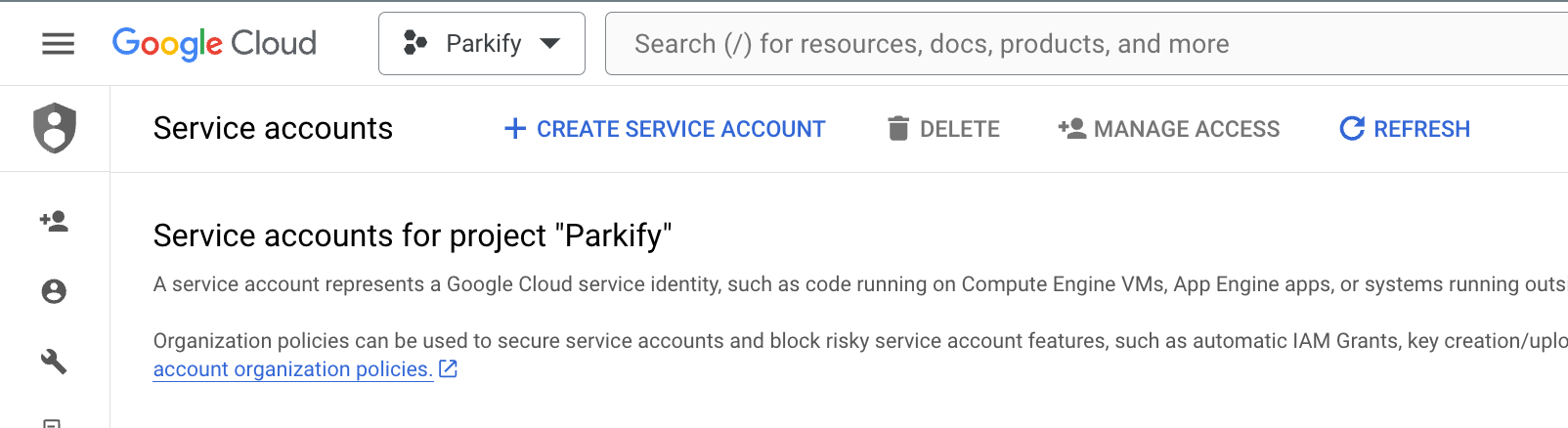 - Fill in the details for the service account. Name it `FireCMS`.
 - Assign the following roles:
- `Firebase Admin`
- `Firebase Admin SDK Administrator Service Agent`
- `Firebase Service Management Service Agent`
- Assign the following roles:
- `Firebase Admin`
- `Firebase Admin SDK Administrator Service Agent`
- `Firebase Service Management Service Agent`
 - Optionally, define the users that can impersonate the service account.
 - Now let's create the JSON key that will be uploaded to FireCMS Cloud.
Find the newly created Service account, and in the dropdown menu, click on `Manage keys`.
- Now let's create the JSON key that will be uploaded to FireCMS Cloud.
Find the newly created Service account, and in the dropdown menu, click on `Manage keys`.
 - Then create a new key.
 - And finally, download the JSON key.
 Now you can **upload this JSON key** to **FireCMS Cloud** and link it to your project.
:::important[Security]
A service account is a special type of Google account that allows non-human users to authenticate and authorize
Google Cloud Platform (GCP) services. It is important to keep the service account key secure, as it can be used to
access your GCP resources. FireCMS Cloud uses this service account to manage your project resources.
Your service account is securely encrypted using Google Cloud KMS.
Make sure to keep your service account key secure and do not share it with unauthorized users.
:::
## Migrating from FireCMS 2.0 to FireCMS Cloud
:::important
This migration guide applies for migrating from FireCMS 2.0 to FireCMS Cloud
:::
FireCMS 3.0 is a major release that introduces a lot of changes. This page
describes the main changes and how to migrate from FireCMS 2.0.
### Create a project in app.firecms.co
FireCMS Cloud requires the creation of a project in [app.firecms.co](https://app.firecms.co).
The new version relies on a backend that allows you to manage your
collections and schemas. The final users are now able to modify collections,
so we use a centralised service to store the configuration.
By doing this you will **not need to specify your Firebase project credentials**,
since the service will be able to access your project directly. You will only need
to specify the **project id**.
### Initialize a FireCMS Cloud project in a new folder
It is advisable to create a new project from scratch and then migrate your collections and views to
the new folder.
In order to do so, run
```
npx create-firecms-app
```
and create a new project in a new folder.
The CLI will initialize an empty project with the new format, and all the configuration files
ready so you don't need to worry about it.
### Migrating collections to the new format
Despite the new format, FireCMS aims allow users to migrate existing apps with minimal
changes. The collections can be now stored both in the FireCMS backend or defined in
code like until now.
Also, you can have collections defined in both places, and decide if the code defined collections
can be modified by the user or not.
Please note that properties defined in code will not be editable by the user, unless you
explicitly mark them as `editable: true`.
### package.json
For reference, the `package.json` file of a new FireCMS Cloud project looks like this:
```json
{
"name": "my-firecms-project",
"private": true,
"version": "1.0.0",
"type": "module",
"scripts": {
"dev": "vite --port 5001",
"build": "vite build",
"serve": "vite preview --port 5001",
"deploy": "run-s build && firecms deploy --project=your-project-id"
},
"dependencies": {
"@firecms/cloud": "^3.0.0",
"firebase": "^12.0.0",
"react": "^18.3.1",
"react-dom": "^18.3.1"
},
"devDependencies": {
"@originjs/vite-plugin-federation": "^1.3.5",
"@tailwindcss/typography": "^0.5.10",
"@types/react": "^18.2.71",
"@types/react-dom": "^18.2.22",
"@vitejs/plugin-react": "^4.2.1",
"autoprefixer": "^10.4.19",
"npm-run-all": "^4.1.5",
"postcss": "^8.4.38",
"tailwindcss": "^3.4.1",
"typescript": "^5.4.3",
"vite": "^5.2.6"
}
}
```
### New format
Since it is now possible to deploy FireCMS in our hosted service, the output
of your project needs to be in a specific format.
The `index.ts` file should export a `FireCMSAppConfig` object, which is defined as follows:
```typescript
export type FireCMSAppConfig = {
/**
* Customization schema version.
*/
version: "1";
/**
* List of the mapped collections in the CMS.
* Each entry relates to a collection in the root database.
* Each of the navigation entries in this field
* generates an entry in the main menu.
*/
collections?: EntityCollection[] | EntityCollectionsBuilder;
/**
* Custom additional views created by the developer, added to the main
* navigation.
*/
views?: CMSView[] | CMSViewsBuilder;
/**
* List of custom form fields to be used in the CMS.
* You can use the key to reference the custom field in
* the `propertyConfig` prop of a property in a collection.
*/
propertyConfigs?: PropertyConfig[];
/**
* List of additional custom views for entities.
* You can use the key to reference the custom view in
* the `entityViews` prop of a collection.
*
* You can also define an entity view from the UI.
*/
entityViews?: EntityCustomView[];
}
```
Let's break down the different fields:
### Collection configuration
Collections have suffered minimal changes. If you don't have any custom components defined, it should be
easy to adapt your collections to the new format.
- You need to define an `id` for each collection, which typically can be the same as the `path`.
- The prop `views` has been renamed to `entityViews`, since they are applied to entities.
- For `AdditionalFieldDelegate` the prop `id` has been renamed to `key`.
To migrate your collections, simply export them in your `index.ts` file:
```typescript
const appConfig: FireCMSAppConfig = {
version: "1",
collections: async (props) => {
return ([
productsCollection
]);
},
propertyConfigs: [
colorPropertyConfig
],
entityViews: [{
key: "test",
name: "Test",
Builder: SampleEntityView
}]
}
```
- The `views` property has been renamed to `entityViews`, since they are applied to entities.
- The `path` prop of views has been renamed to `key`, for consistency with the rest of the library.
### Migrating custom components (MUI)
FireCMS 3.0 is based on `tailwindcss` instead of `mui`.
Mui was great for the initial versions of FireCMS, but it was being a big performance bottleneck
and it was hard to customize.
The new version of FireCMS has built in almost 50 new components implemented with tailwindcss, that
mimic in a good way the material-ui components. You are encouraged to migrate your custom components
to the new format.
However, if you want to keep using mui: you can still use the old components, but you will need to
install the `mui` package manually.
```bash
npm install @mui/material @emotion/react @emotion/styled
```
or
```bash
yarn add @mui/material @emotion/react @emotion/styled
```
If you need MUI icons, run:
```bash
npm install @mui/icons-material
```
or
```bash
yarn add @mui/icons-material
```
#### Components that have no equivalent:
- `Box`: The box component is just a wrapper used by mui to apply styles. You can use a `div` instead.
Tip: ChatGPT is great at converting Box components to div with tailwind classes.
- `Link`: Use `a` instead.
- `FormControl`
#### Components that change behaviour:
- `Menu` and `MenuItem`: Menu items do not have an id anymore. You can add an `onClick` props per menu item.
- `Select` does not use `labelId` anymore. Just add the label as a component in `label`.
- `SelectChangeEvent` is now `ChangeEvent
Now you can **upload this JSON key** to **FireCMS Cloud** and link it to your project.
:::important[Security]
A service account is a special type of Google account that allows non-human users to authenticate and authorize
Google Cloud Platform (GCP) services. It is important to keep the service account key secure, as it can be used to
access your GCP resources. FireCMS Cloud uses this service account to manage your project resources.
Your service account is securely encrypted using Google Cloud KMS.
Make sure to keep your service account key secure and do not share it with unauthorized users.
:::
## Migrating from FireCMS 2.0 to FireCMS Cloud
:::important
This migration guide applies for migrating from FireCMS 2.0 to FireCMS Cloud
:::
FireCMS 3.0 is a major release that introduces a lot of changes. This page
describes the main changes and how to migrate from FireCMS 2.0.
### Create a project in app.firecms.co
FireCMS Cloud requires the creation of a project in [app.firecms.co](https://app.firecms.co).
The new version relies on a backend that allows you to manage your
collections and schemas. The final users are now able to modify collections,
so we use a centralised service to store the configuration.
By doing this you will **not need to specify your Firebase project credentials**,
since the service will be able to access your project directly. You will only need
to specify the **project id**.
### Initialize a FireCMS Cloud project in a new folder
It is advisable to create a new project from scratch and then migrate your collections and views to
the new folder.
In order to do so, run
```
npx create-firecms-app
```
and create a new project in a new folder.
The CLI will initialize an empty project with the new format, and all the configuration files
ready so you don't need to worry about it.
### Migrating collections to the new format
Despite the new format, FireCMS aims allow users to migrate existing apps with minimal
changes. The collections can be now stored both in the FireCMS backend or defined in
code like until now.
Also, you can have collections defined in both places, and decide if the code defined collections
can be modified by the user or not.
Please note that properties defined in code will not be editable by the user, unless you
explicitly mark them as `editable: true`.
### package.json
For reference, the `package.json` file of a new FireCMS Cloud project looks like this:
```json
{
"name": "my-firecms-project",
"private": true,
"version": "1.0.0",
"type": "module",
"scripts": {
"dev": "vite --port 5001",
"build": "vite build",
"serve": "vite preview --port 5001",
"deploy": "run-s build && firecms deploy --project=your-project-id"
},
"dependencies": {
"@firecms/cloud": "^3.0.0",
"firebase": "^12.0.0",
"react": "^18.3.1",
"react-dom": "^18.3.1"
},
"devDependencies": {
"@originjs/vite-plugin-federation": "^1.3.5",
"@tailwindcss/typography": "^0.5.10",
"@types/react": "^18.2.71",
"@types/react-dom": "^18.2.22",
"@vitejs/plugin-react": "^4.2.1",
"autoprefixer": "^10.4.19",
"npm-run-all": "^4.1.5",
"postcss": "^8.4.38",
"tailwindcss": "^3.4.1",
"typescript": "^5.4.3",
"vite": "^5.2.6"
}
}
```
### New format
Since it is now possible to deploy FireCMS in our hosted service, the output
of your project needs to be in a specific format.
The `index.ts` file should export a `FireCMSAppConfig` object, which is defined as follows:
```typescript
export type FireCMSAppConfig = {
/**
* Customization schema version.
*/
version: "1";
/**
* List of the mapped collections in the CMS.
* Each entry relates to a collection in the root database.
* Each of the navigation entries in this field
* generates an entry in the main menu.
*/
collections?: EntityCollection[] | EntityCollectionsBuilder;
/**
* Custom additional views created by the developer, added to the main
* navigation.
*/
views?: CMSView[] | CMSViewsBuilder;
/**
* List of custom form fields to be used in the CMS.
* You can use the key to reference the custom field in
* the `propertyConfig` prop of a property in a collection.
*/
propertyConfigs?: PropertyConfig[];
/**
* List of additional custom views for entities.
* You can use the key to reference the custom view in
* the `entityViews` prop of a collection.
*
* You can also define an entity view from the UI.
*/
entityViews?: EntityCustomView[];
}
```
Let's break down the different fields:
### Collection configuration
Collections have suffered minimal changes. If you don't have any custom components defined, it should be
easy to adapt your collections to the new format.
- You need to define an `id` for each collection, which typically can be the same as the `path`.
- The prop `views` has been renamed to `entityViews`, since they are applied to entities.
- For `AdditionalFieldDelegate` the prop `id` has been renamed to `key`.
To migrate your collections, simply export them in your `index.ts` file:
```typescript
const appConfig: FireCMSAppConfig = {
version: "1",
collections: async (props) => {
return ([
productsCollection
]);
},
propertyConfigs: [
colorPropertyConfig
],
entityViews: [{
key: "test",
name: "Test",
Builder: SampleEntityView
}]
}
```
- The `views` property has been renamed to `entityViews`, since they are applied to entities.
- The `path` prop of views has been renamed to `key`, for consistency with the rest of the library.
### Migrating custom components (MUI)
FireCMS 3.0 is based on `tailwindcss` instead of `mui`.
Mui was great for the initial versions of FireCMS, but it was being a big performance bottleneck
and it was hard to customize.
The new version of FireCMS has built in almost 50 new components implemented with tailwindcss, that
mimic in a good way the material-ui components. You are encouraged to migrate your custom components
to the new format.
However, if you want to keep using mui: you can still use the old components, but you will need to
install the `mui` package manually.
```bash
npm install @mui/material @emotion/react @emotion/styled
```
or
```bash
yarn add @mui/material @emotion/react @emotion/styled
```
If you need MUI icons, run:
```bash
npm install @mui/icons-material
```
or
```bash
yarn add @mui/icons-material
```
#### Components that have no equivalent:
- `Box`: The box component is just a wrapper used by mui to apply styles. You can use a `div` instead.
Tip: ChatGPT is great at converting Box components to div with tailwind classes.
- `Link`: Use `a` instead.
- `FormControl`
#### Components that change behaviour:
- `Menu` and `MenuItem`: Menu items do not have an id anymore. You can add an `onClick` props per menu item.
- `Select` does not use `labelId` anymore. Just add the label as a component in `label`.
- `SelectChangeEvent` is now `ChangeEvent{authController.user ? <>Logged in as {authController.user.displayName} : <>You are not logged in}
Use this button to select an entity under the path `products` programmatically
Use this button to open a snackbar
Use this button to open an entity in a custom path with a custom schema
You can include full entity collections in your views:
Smallest
Small
Medium
Large